


ImageVault end of support: how Niteco's asset migration machine moves you to Optimizely


ImageVault, a digital asset management (DAM) system used by many Optimizely websites, is reaching the end of its life. If your site still stores its images, videos and documents in ImageVault, you need to move them. The question is how to do it without broken images, broken links or broken page layouts.
At Niteco, we built the asset migration machine to answer that question. It moves your assets from ImageVault, or any other legacy DAM, into the Optimizely native media library or Optimizely DAM. It also rewrites every old link and code reference, so your site keeps working on day one.
Why ImageVault migration is now a must for enterprises
For years, ImageVault was a popular digital asset management (DAM) system for Optimizely (formerly Episerver) websites, with more than 230 customers in Europe and the US by 2021. That is changing. In 2021, Papirfly bought ImageVault's maker, Meriworks. Since mid-2025, the ImageVault connector for Optimizely has received only bug fixes, and Papirfly is moving ImageVault cloud customers to its own DAM platform. Papirfly has also announced that ImageVault will be shut down.
For an enterprise, staying on a DAM that is being phased out is a growing risk:
- Maintenance only. The last feature release of the ImageVault connector for Optimizely came in June 2025. Every release since has been a bug fix.
- Blocked upgrades. The ImageVault add-on is built for Optimizely CMS 12. Its NuGet package and changelog list CMS 12 versions only and do not mention CMS 13. Until a newer build appears, treat a move to CMS 13 as blocked.
- A deadline you don't control. When the service shuts down, images and files on your live site can disappear.
- Paying twice. You keep paying a DAM license on top of Optimizely, which already includes a media library.
The longer you wait, the bigger the job gets. Asset libraries grow every year as teams add campaign images, product photos, videos and PDFs. Each file can also be linked from many pages and many places in your code.
This is why we recommend that every client still on ImageVault plans the move now.
Where to move: Optimizely native media or Optimizely DAM
Most of our clients move to one of two places inside Optimizely. Both keep your assets inside the Optimizely platform, with no third-party DAM to license.
| Optimizely native media library | Optimizely DAM (part of Optimizely Content Marketing Platform, or CMP) | |
| Best for | Teams that mainly use assets on the website | Teams that share assets across web, campaigns and channels |
| Where assets live | Inside Optimizely CMS, in the CMS's own file storage | In a central DAM, connected to the CMS |
| Extra license | None | Requires Optimizely CMP |
| Editor experience | Assets sit next to pages in the CMS | Assets are managed with workflows, metadata and approvals |
We help you choose based on how your teams work today, not on features alone. The asset migration machine supports both targets.
Why moving assets is harder than it looks
Copying files from one system to another is the easy part. The hard part is everything that points to those files.
- Links in content: Pages, blocks and rich text fields link to ImageVault URLs. Every one must point to the new location, or visitors see broken images.
- References in code: Templates and helper classes call the ImageVault API directly. A large site can have more than a thousand of them.
- Page layouts: ImageVault handles image sizes and crops its own way. Switch the system without care and images can render at the wrong size, breaking the layout.
- Metadata: Alt text, captions, tags and usage rights must move with the file. Lose them and you hurt both accessibility and SEO.
Done by hand, this uses a lot of developer and editor time, and every manual step is a chance for errors. That is the problem our asset migration machine solves.
How Niteco's asset migration machine works
The asset migration machine is our AI-assisted tool for moving media from any legacy DAM into Optimizely. It gives you an end-to-end service: we move the assets, fix every link and clean up the code, so you don't have to.
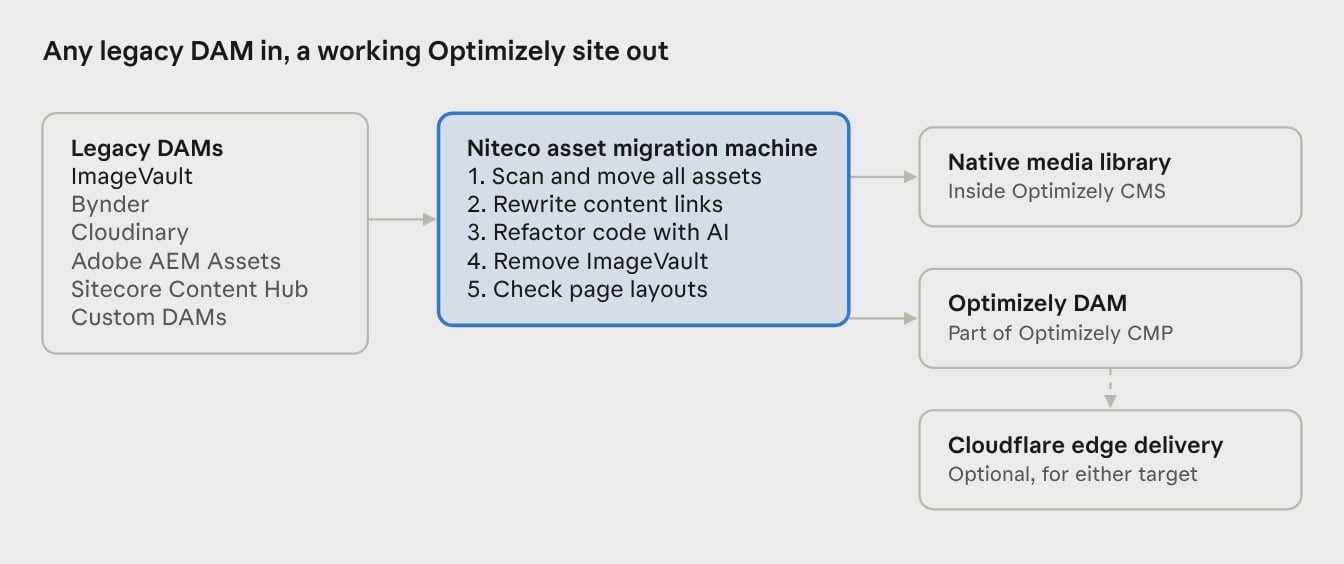
The machine takes assets from ImageVault or another DAM and delivers a working site on Optimizely native media or Optimizely DAM.
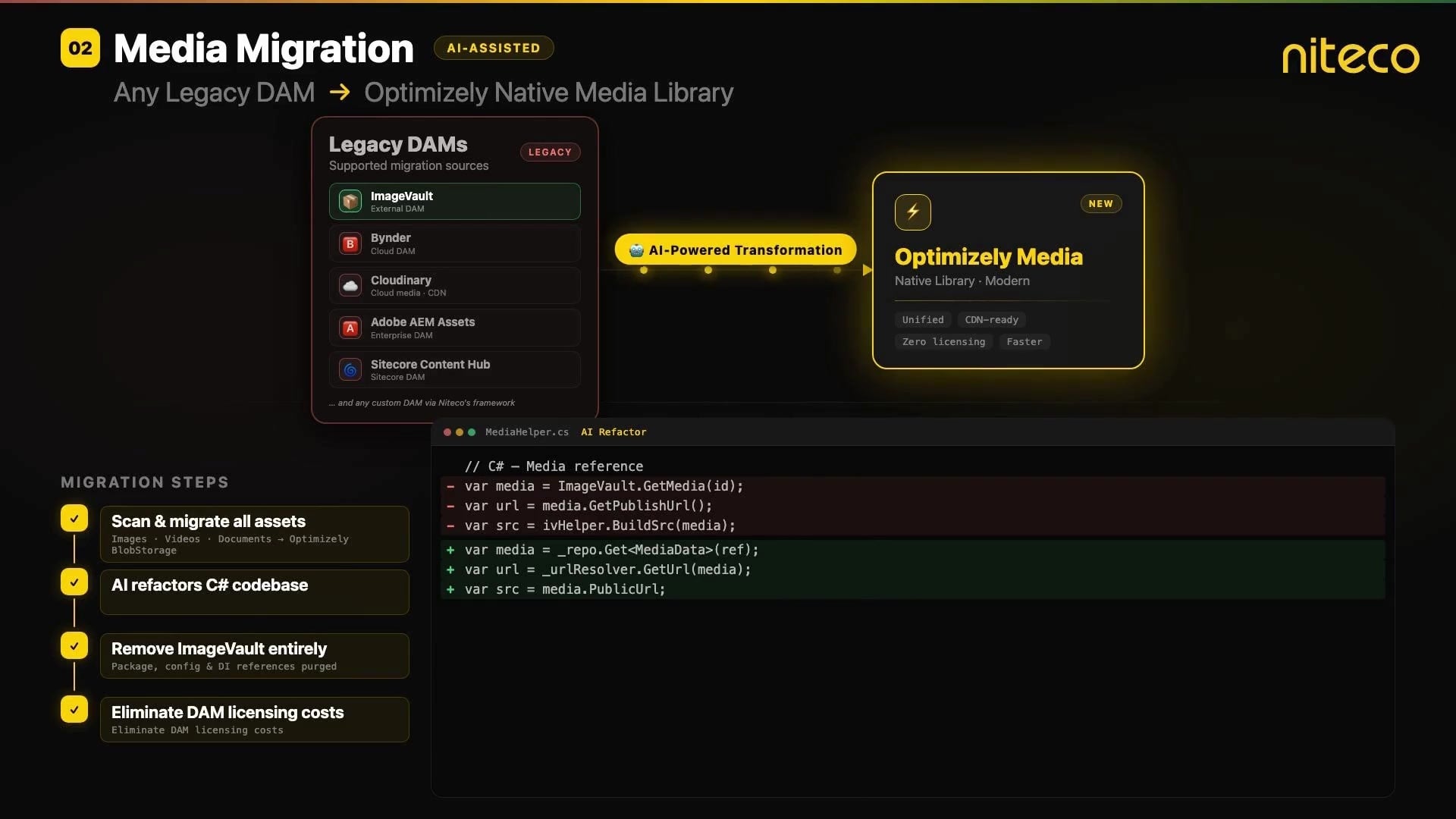
- Scan and move all assets: We scan your whole library and move images, videos and documents into Optimizely, with their folders and metadata.
- Rewrite content links: Every link to an old ImageVault URL in pages, blocks and rich text is changed to the new asset. Editors and visitors see no broken images.
- Refactor the code with AI: AI rewrites the C# code that calls ImageVault so it uses Optimizely's media API instead. How many references need rewriting depends on the size of your codebase. A large site can have more than a thousand, around 1,200 in one migration we ran.
- Remove ImageVault entirely: We remove the ImageVault package, its settings and its references. Your solution gets simpler, and you no longer pay for a third-party DAM license.
- Check page layouts: We compare pages before and after, so images keep the right size and crop and your layouts stay intact.
Faster images as a bonus
A migration is also a good moment to speed up image delivery. We can serve your new assets through Cloudflare's network, which runs in more than 330 cities worldwide. Images are converted to modern formats such as AVIF and WebP and sized for each device. In one example, the download size of a page's images fell by 80%, from 4.2 MB to 850 KB, and latency dropped by 65%.
Proven on enterprise projects
The asset migration machine is not a prototype. We have already used it to move enterprise clients off ImageVault on at least five projects in the Nordics.
These clients came to us with large asset libraries built up over many years and tied deeply into their Optimizely templates and content.
In each case, we handled the migration end to end, from moving the files to fixing links and cleaning up the code. The result is a simpler Optimizely setup, one fewer license to pay for and no broken links for visitors.
Plan your ImageVault migration with Niteco
If your Optimizely site still runs on ImageVault, now is the time to plan the move. We will review your asset library, recommend the right target and show you what the migration will involve.
Frequently asked questions
Papirfly, which owns ImageVault, has announced that ImageVault will be shut down. The ImageVault connector for Optimizely has received only bug fixes since mid-2025, and it lists no support for CMS 13. Optimizely sites that rely on it should plan a migration now.
For most Optimizely websites, the best alternative is already inside the platform: the Optimizely native media library or Optimizely DAM in Optimizely CMP. Both remove the third-party DAM license and the external connector.
You move the files and their metadata, then update every content link and code reference that points to ImageVault. Finally, you remove the ImageVault add-on. Niteco's asset migration machine automates each of these steps.
It can, if links, code references and image sizes are not handled. Our asset migration machine rewrites old links and code to point to the new assets. We then compare pages before and after the move to check that images keep their size and crop.
Yes. The asset migration machine also supports Bynder, Cloudinary, Adobe Experience Manager (AEM) Assets and Sitecore Content Hub. We can extend it to custom DAMs too.