

Optimizely CMS 13: A connectivity shift, not another re-platform


This year, at both the New York and the London Opticon events, I was kindly asked to speak as a Platinum OMVP around upgrades with the CAB (Customer Advisory Board).
While listening to customer pain points in both of these sessions, one big question came up more than others. We've just been through a major upgrade with CMS 12 and Commerce 14, and that was tough and often long. Will we see this again with the next upgrade, and what's the difference?
It is a fair question. For many organizations, the move from CMS 11 to CMS 12 and from Commerce 13 to Commerce 14 was long, expensive and disruptive. When a team that lived through that sees another major version number, caution is the right instinct.
My answer, in those sessions and here, is that the two upgrades are different in kind. CMS 11 to 12 was a technology re-platform. CMS 13 is a connectivity shift. Understanding that difference changes how you budget, plan and staff the work.
Looking back: CMS 11 to 12 was a re-platform
CMS 12 and Commerce 14 moved Optimizely off the legacy .NET Framework and onto modern, cross-platform .NET. That was the right decision for performance, security, best practice and the long-term future of the product. It was also, for most customers, a re-platform wearing an upgrade's label.
The foundations underneath every solution changed at once. ASP.NET MVC on .NET Framework gave way to ASP.NET Core, configuration moved out of web.config, the request pipeline and dependency injection were rebuilt, and many add-ons had to be rewritten or replaced before a project could even compile.
Why it was so hard
- Technical: custom code, integrations and third-party packages written for .NET Framework had to be refactored or rebuilt. On mature Commerce sites, years of customisation made this the largest single cost.
- Project management: scope was hard to estimate until the codebase was opened up. Discovery often surfaced work nobody knew existed, and timelines moved with it.
- Process: hosting, build pipelines, testing and release processes all had to change alongside the code. Teams were effectively running two platforms until cut-over.
That combination is why so many CMS 12 and Commerce 14 projects ran for months, not weeks. Anyone who carried one of those programmes is right to approach the next major version carefully.
Looking forward: CMS 13 is a connectivity shift
CMS 13 stays on the same modern .NET foundation that CMS 12 established, moving to .NET 10. The core technology your team already knows does not change. What changes is how the platform connects: to the rest of Optimizely, to your other systems, and to the Optimizely agent platform, which will bring the entirety of agentic directly into your CMS and Commerce experience.
CMS 13 brings three connective components to the centre of the platform:
- Opti ID is a single identity layer across Optimizely products. It replaces per-product logins and becomes the way editors and administrators access the platform.
- Optimizely Graph is the content and data layer. It indexes content so any channel, product or agent can query it, and it replaces Search & Navigation, which is not supported in CMS 13.
- Optimizely Connect Platform (OCP) is the integration layer. It connects Optimizely to external systems and services so data can move between them.
Together, they are the glue of the platform. Graph lets Optimizely's agent platform reach your content and your external product systems and services. OCP connects those systems to each other. Opti ID bridges the whole estate with one identity.
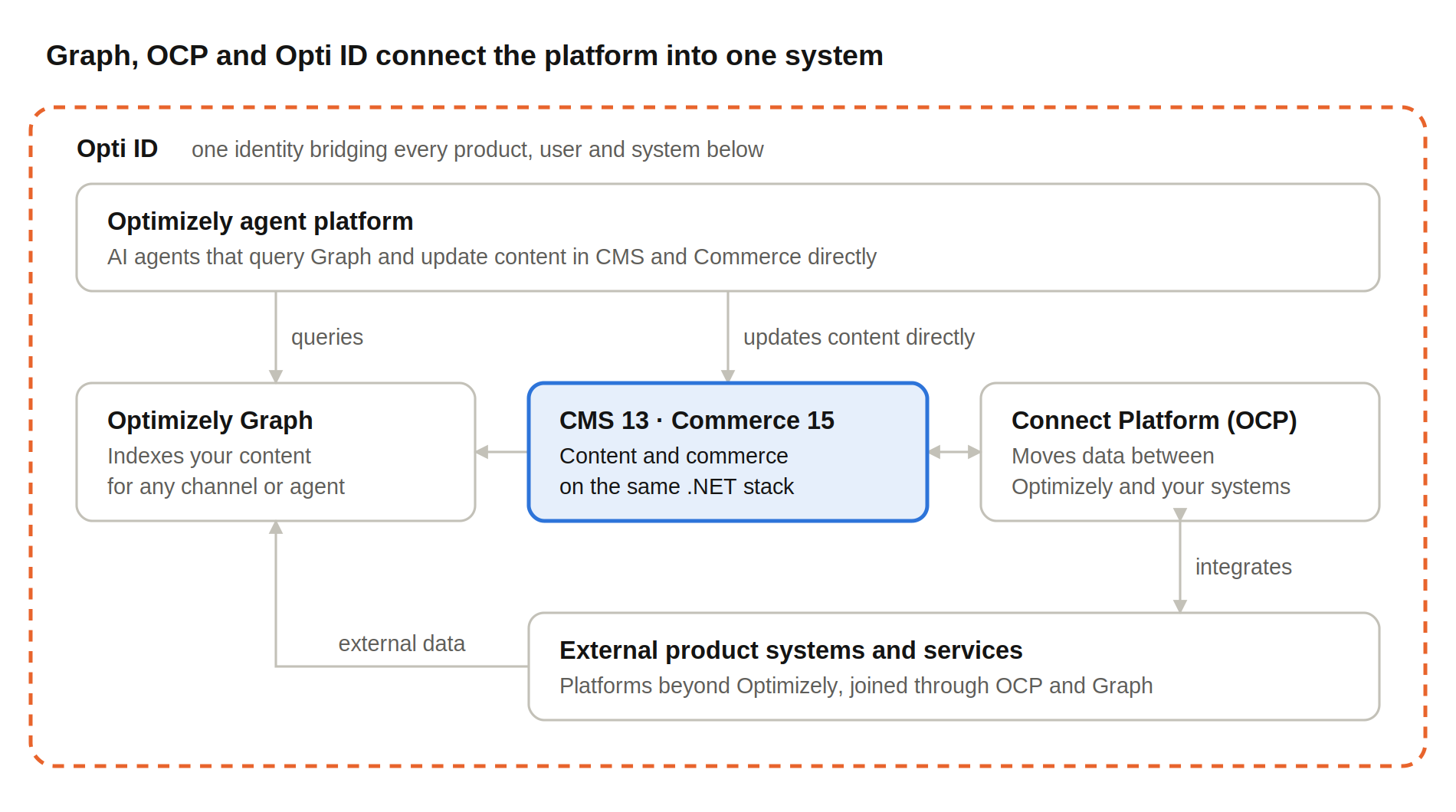
CMS 13 connectivity · Graph, OCP and Opti ID around the core
Graph feeds agents and channels, OCP links your wider estate, and Opti ID wraps the whole system in one identity.
Where the effort actually sits
An upgrade to CMS 13 and Commerce 15 is far less complicated than the major replatform of CMS 12 and Commerce 14. So where does the real effort actually occur? Let me break this down for you.
From a technology point of view, there are only really two things here that we're having to worry about
Optimizely Graph
Moving everything from Search and Navigation to Optimizely Graph might seem daunting, but it's actually not too bad. There's a full .NET SDK, migration documentation, and tooling that can help you migrate everything when wanting to keep execution in the backend .NET process. Yes, there will be some tweaks to make, but there's a good foundational structure out there to be able to achieve this.
On top of this, you can also choose to move this to the frontend and have everything exposed via a read-only key, very much how the SaaS product works, splitting the head into a separate infrastructure instance.
And finally, the marketing features. One of the delays for people adopting Graph was the lack of comparable marketing features to what you see in the user interface, to what you have today. Now with Optimizely most features have been moved over, and ones that need a marketing interface have been moved into the graph management system. For developers, you can create a developer instance. You can see all of this and how to set it up in my blog Optimizely Graph - Provisioning, User Management & Developer Instances.
Opti ID
Opti ID is just replacing your admin system logins with the Optimizely Identity Platform, and this is usually connected to your own enterprise identity. This can be set up to sync with systems such as Entra, and then you have one single sign-in with your organizational ID. Once this is done, it's just a case of mapping over the groups to roles inside the admin platform, connecting the dots together, and everything should work perfectly. There are a couple of ways of connecting to ESO, which you can see in my colleague's post about setting up Opti Id SSO with and without SCIM.
However, where the core effort actually sits is mostly in the project process. The technical elements are not that complicated for most developers, so realistically, it's the QA/UAT, as this is a major platform version: making sure things are tested, delivered, and signed off. I tend to see a large amount of the project process actually being in these areas rather than in the technical work, so it's just key to factor that in.
And where this is also critically key is with those customers who are thinking about doing an interim upgrade if they're on CMS 11 or Commerce 13 and want to do multiple hops. I would say no to this. CMS 13 and Commerce 15 are mature enough to be upgraded directly to. Adding two hops, or just adding large amounts of testing and validation time, into your project timeline.
Two upgrades, side by side
The version numbers look alike; the work underneath does not.
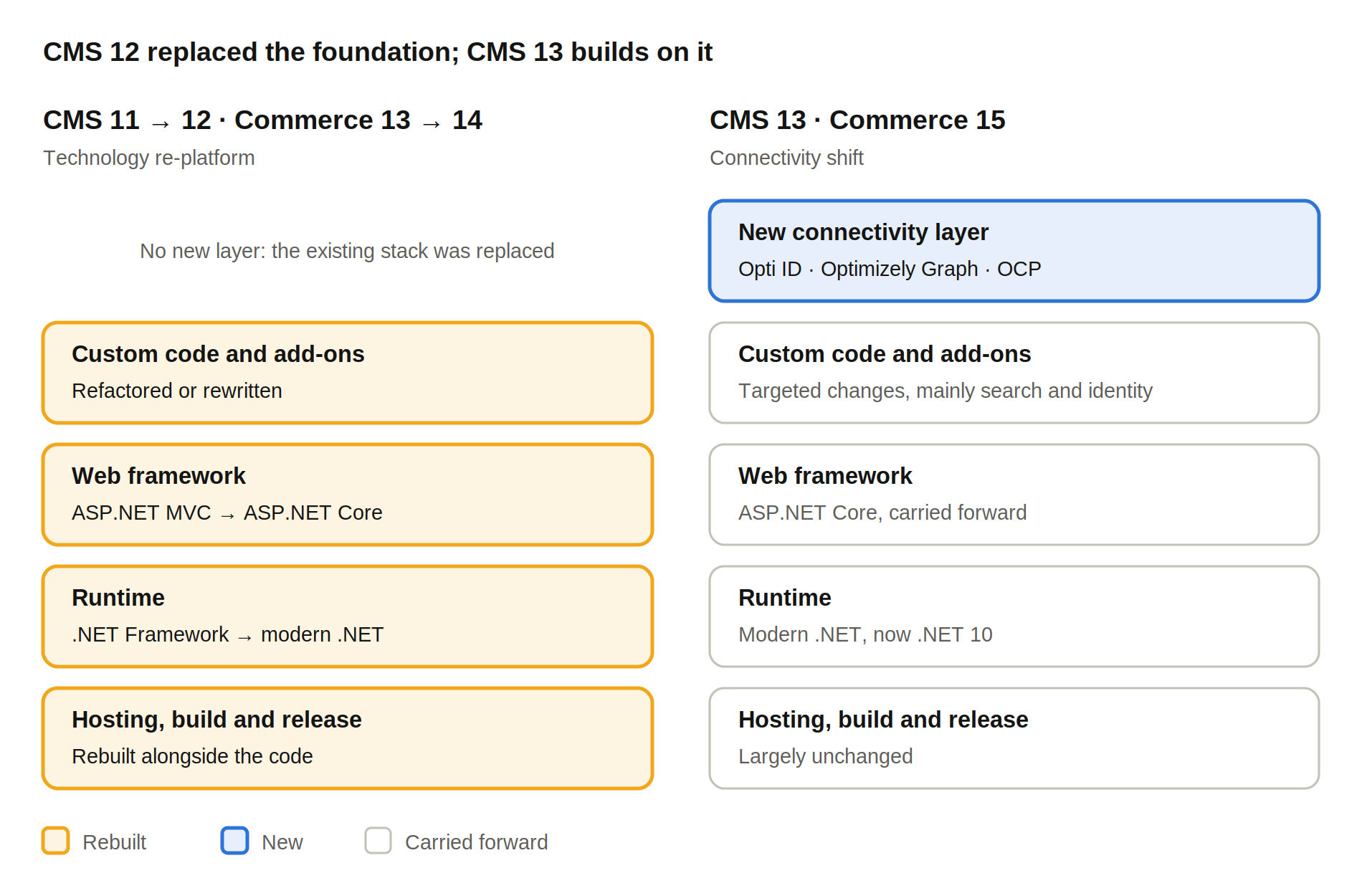
Re-platform vs connectivity shift: What changes in each layer
Last time every layer of the stack was rebuilt. This time the foundation carries forward and a connectivity layer is added on top.
| CMS 11 → 12 / Commerce 13 → 14 | CMS 13 / Commerce 15 | |
| Nature of change | Technology re-platform | Connectivity shift |
| Core framework | .NET Framework to modern .NET and ASP.NET Core | Stays on modern .NET (now .NET 10) |
| Custom code | Broad refactoring and rewrites | Targeted changes, mainly around search and identity |
| Main complexity | The whole solution and its add-ons | Moving from Search & Navigation to Optimizely Graph |
| New capability unlocked | Performance, security, a future-proof stack | Shared identity, a shared content graph, integrations and agents |
| Estimating | Hard until discovery is complete | Predictable once Graph usage is mapped |
What this means for your organisation
The right question is no longer "can we afford another painful upgrade?" It is "how quickly can we connect our platform?"
For marketing and digital leaders, CMS 13 is the route to the capabilities Optimizely is building next. A shared content graph and a single identity mean content, commerce data and experimentation can work together, and AI agents can act on your content rather than sit beside it. Staying on CMS 12 means watching those capabilities from the outside.
As we saw at Opticon this year, the Optimizely agentic platform is a key part of the strategic future when it comes to marketing operations. The CMS 13 and Commerce 15 upgrades unlock that agentic capability, allowing you to create complex workflows and systems that can save you time, freeing up the busy work, and can help make sure your content is not stagnant. It's clean, it's best practice, and also supports the agentic future with AEO/GEO and WebMCP.
For CTOs and technical leaders, the risk profile is different from last time. The framework your team knows stays in place. The work concentrates on a small number of well-defined areas: Graph, identity and integration. That makes it easier to scope, phase and fit alongside other roadmap commitments. Think of this as a foundational structure. Upgrading to this should be seen as enabling AI, agentic, and the new features of the Optimizely platform. Think about the way you develop. Think about the way the platforms run, and make sure it's ready for the future.
For anyone planning the upgrade, the most valuable early step is auditing your estate, your marketing activities, and how you work with the Optimizely products, understanding what you use of search and navigation, how your company and marketing activities interact with the platform, and planning everything out so you can understand how you would benefit from the upgrade.
How Niteco helps
Niteco has delivered Optimizely upgrades through every major version, including the CMS 12/13 and Commerce 14/15 using our proprietary AI migration machine and testing systems. We know where those projects stalled, and we have built a robust project process around these to be able to upgrade you in the most accelerated timeline with the highest quality of delivery.
- Upgrade readiness assessment. We map your Search & Navigation usage, identity setup, integrations and add-ons, then give you a scoped, phased plan with clear effort estimates.
- Graph migration. We rebuild search, listings and navigation on Optimizely Graph, and model your content so it is ready for agents and other channels.
- Opti ID and OCP enablement. We set up identity and connect the systems that matter to your business, so the platform works as one.
- Commerce expertise. Our team works with B2C retailers running Optimizely Commerce every day, so we plan around trading calendars, catalogues and checkout, not just code.
- Delivery at scale. Strategy and architecture led locally, with a large, experienced Optimizely engineering team behind it.
If you are weighing up CMS 13 or Commerce 15, the first step is a conversation, not a commitment. Talk to Niteco about where your platform is today and what a connected Optimizely could do for you.
how we can help you.
