


Replacing Optimizely Find with OpenSearch on CMS 13


Optimizely CMS 13 no longer supports Optimizely Search & Navigation. The CMS 13 GA release notes state that "CMS 13 and future releases no longer support Optimizely Search & Navigation implementations."
For most projects, Optimizely Graph is the usual replacement. That is also the direction covered by the migration guidance. But CMS 13 allows another approach: bringing your own search provider.
On one multi-brand, multi-language Optimizely site, we chose OpenSearch. We replaced Find for both customer-facing search and editor search inside the CMS. We started the work on CMS 12, before the CMS 13 upgrade, so search was already running on OpenSearch when the upgrade happened.
This article explains why we chose OpenSearch, what we had to rebuild after leaving Find, and the trade-offs we found along the way.
Why we chose OpenSearch
The main reason was not simply that OpenSearch can run full-text search. It was the amount of control we needed over the search model.
The project had several requirements:
- Multiple brands and languages needed to be isolated.
- Search needed to cover data outside the CMS.
- Some searches relied on partial matches, including product codes.
- We wanted control over analyzers, relevance and scoring.
- We wanted to start the migration before the CMS 13 upgrade.
OpenSearch gave us those options without tying the search implementation to the CMS version.
There were also practical equivalents for most of the Find features we were using:
- Partial matching. OpenSearch supports wildcard queries, including the *term* pattern used by some Find implementations (wildcard).
- Fuzzy matching and synonyms. Fuzzy queries handle typos, while synonyms can be configured with the synonym_graph token filter (synonym graph).
- Facets. Terms aggregations provide the counts needed for search facets (terms).
- "Did you mean". Term and phrase suggesters can provide spelling suggestions (did you mean).
- Zero-downtime reindexing. Index aliases can switch between indexes atomically (index alias).
OpenSearch also gave us capabilities that were useful for this project:
- External content. The Bulk API accepts arbitrary JSON documents, so archives, PDFs, product data and content from other platforms can use the same search infrastructure.
- Semantic and hybrid search. OpenSearch provides k-NN, neural and hybrid search (vector search concepts).
- Search analytics. Search and click data can live in an index we control, using the User Behavior Insights schema.
- Relevance control. Boosting, date decay, analyzers and custom scoring can be implemented as part of our search layer.
For .NET, OpenSearch provides the OpenSearch.Client client and a companion package for AWS IAM request signing.
OpenSearch can also be self-hosted or run through a managed service such as Amazon OpenSearch Service or Aiven. With a managed service, patching, upgrades, backups and node replacement are handled by the provider.
What we had to rebuild after leaving Find
The biggest difference is simple:
Find is a search product. OpenSearch is a search engine.
Find handled a lot of integration work for us. With OpenSearch, those pieces became application code and infrastructure that we had to own.
| Optimizely Find | OpenSearch | |
| Indexing | Built into the CMS integration: publish and it is indexed | We build it: event handlers, a queue, bulk writes and a scheduled sync job |
| Query API | Typed .NET API. A wrong field name does not compile | JSON query DSL. Field names are strings |
| Index layout | One shared index, filtered by site and language | We design it |
| Editor tooling | Admin screen for best bets, synonyms, autocomplete, related queries and statistics (Find statistics) | Nothing for editors out of the box |
| Hosting | Run by Optimizely | Run by us or a managed provider |
None of these pieces is particularly unusual. The difference is that they now belong to our application and operations model.
Architecture
Our goal was to keep the change invisible to editors and customers. The application still has one search interface. Behind that interface, the search service builds OpenSearch queries and the indexing pipeline keeps the indexes in sync with the CMS.
There are three main paths:
- Query path handles searches.
- Live indexing reacts to publishing events.
- Scheduled sync catches changes that the event pipeline does not see.
The same indexing pipeline can also accept external content.
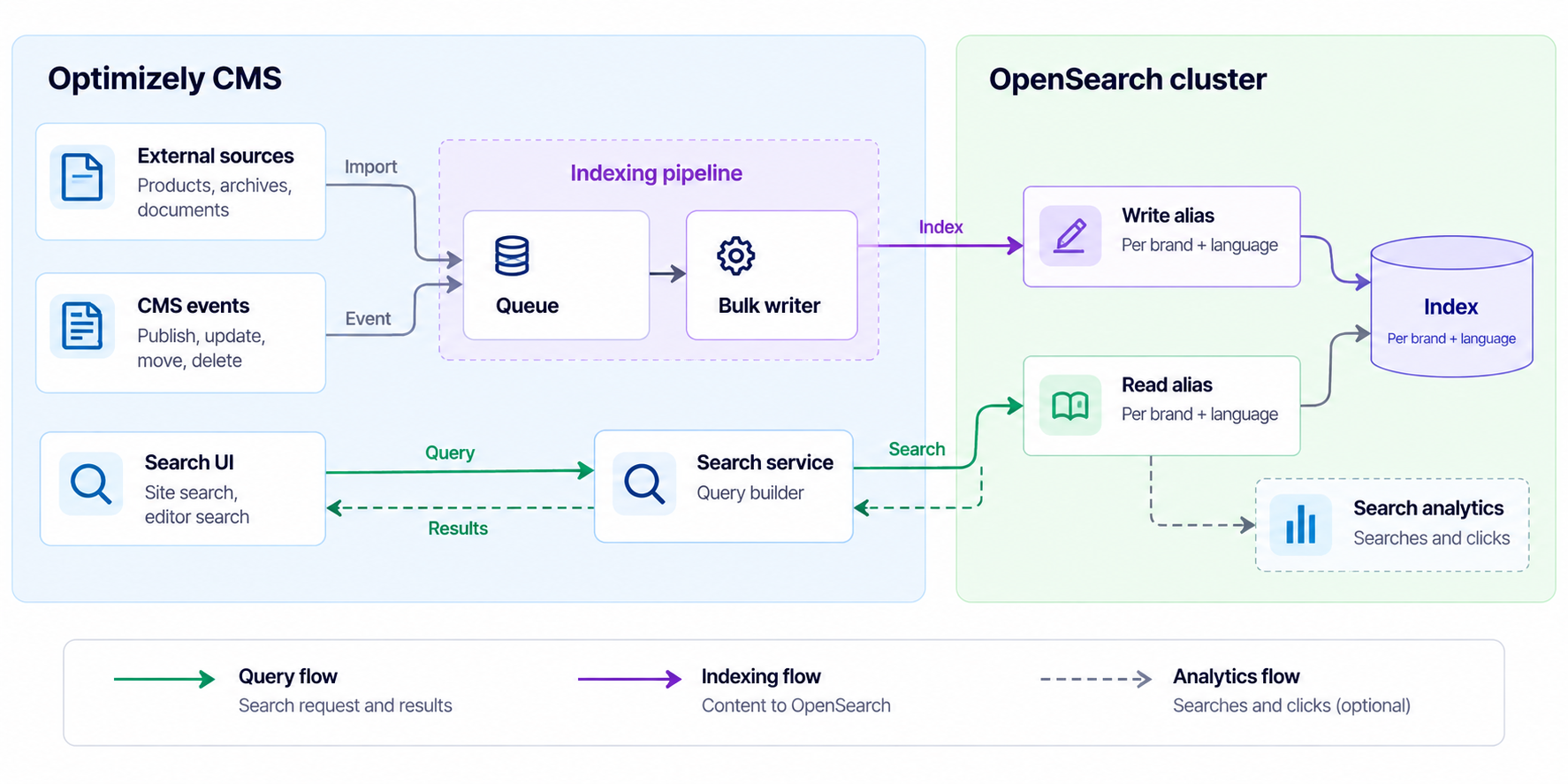
OpenSearch architecture used to replace Optimizely Find.
Query path
Every page, controller and API calls the same search interface, so code above it does not need to know about OpenSearch. The search service builds the OpenSearch query.
Site, language, read access and publish dates are filters, so they do not affect relevance. Expired content is excluded by the query.
Each query also has a timeout: 3 seconds for the search page and 1 second for autocomplete.
Live indexing on publish
The event pipeline is straightforward for normal editor activity. Even on a busy day, editors publish only a handful of pages per minute, so sending those documents directly to OpenSearch would be fine.
The harder case is content changed by code.
A product import, PIM sync or bulk migration can publish thousands of items within a second. Sending one indexing request for every event can flood the cluster, slow down the job that triggered the events and increase the chance of losing changes when requests start to fail.
Instead, the CMS event handlers put a content reference into a bounded in-memory queue. A background worker drains the queue in batches, loads the current published version of each item and sends the documents through the Bulk API.
A single editor publish is still searchable within moments. A large import becomes a small number of bulk requests instead of thousands of individual requests.
A few details make the pipeline reliable:
- The queue stores references, not content. A late or duplicate event reloads the current state. Multiple changes to the same item can therefore collapse into one write.
- Documents carry a version. We use the content's last-saved time to order writes, so an older state does not replace a newer one.
- Errors are handled per document. Temporary errors such as HTTP 408, 429 and 5xx are retried. Other failures are recorded with their reason so a missing document can be investigated later.
- Shared blocks re-queue their pages. When a block changes, the pages that embed it are queued too, up to a configured limit.
- Queue overflow triggers a full sync. The queue has a size limit so a large import cannot exhaust application memory. If it overflows, the affected market is flagged for a full synchronization instead of silently losing changes.
Once written, a document becomes searchable after the next refresh, which is every second by default (index settings).
Scheduled sync
Not every change produces an event. Examples include content expiration and an application restart in the middle of a batch.
The scheduled job handles those cases. It runs one market at a time under a lock, so two CMS servers do not synchronize the same market at the same time.
The job:
- creates missing indexes and aliases
- writes content changed since the previous run
- periodically removes documents that the CMS no longer returns
- fills a new environment from an empty cluster
If a content source fails during the run, the job does not remove documents. That avoids turning a temporary source failure into a large deletion.
Index design: one index per brand and language
Instead of Find's shared index, each brand and language gets its own index behind a read alias and a write alias.
The alias name provides the isolation boundary. A missing query filter therefore cannot accidentally return content from another brand or language.
Text fields use the language analyzer for the market, with an accent-insensitive sub-field for matching. Product codes are stored as exact, case-insensitive values. Only fields used by queries are mapped explicitly.
Each index has a single shard. The data per market is well below OpenSearch's 10 to 50 GB per shard guidance, and with one shard, facet counts are exact rather than approximate.
Editor search inside the CMS
Optimizely allows custom search providers in the editing UI through ISearchProvider.
Our providers for pages, blocks and media query the brand index in the editor's language. They then check the editor's read access in the CMS before returning a result because the OpenSearch documents do not contain access lists.
The same index serves both customer search and editor search, so there is no second indexing pipeline to maintain.
Synonyms, best bets and statistics
Leaving Find also meant replacing its administration features.
- Synonyms and best bets live on a settings page per market inside the CMS. A best bet raises a matching page for a phrase rather than adding a page that does not match. It points to a page reference, so renaming the page does not break the rule.
- Search and click tracking goes into a separate tracking index using the User Behavior Insights schema.
- "Did you mean" comes from the phrase suggester over indexed content. Related queries come from stored search history, with personal and abusive text filtered before it is shown.
Cost
Cost depends heavily on content size, traffic and the hosting model, so the following numbers should be treated as a reference scenario rather than a production estimate. They use public list prices for Europe, checked in October 2026.
The scenario:
- 500,000 documents of about 15 KB each, around 7.5 GB of source data.
- 4 million search requests a month, including autocomplete, with no seasonal peak.
- 1 production environment and 2 non-production environments.
- Production runs 3 nodes with 2 vCPU and 8 GB RAM each, one per availability zone. Each non-production environment runs one node of the same size.
- Azure West Europe for the Azure options and AWS Ireland for AWS, with 1-year reservations where the provider offers them.
| Hosting option | Configuration | Production, 1 year | All 3 environments, 1 year | What the price includes |
| Self-hosted on Azure VMs | 3 × Standard_D2s_v5 in production, 1 per non-production environment. 1-year reservation, 32 GB OS disk and 64 GB data disk per node. | ~$2,480 | ~$4,130 | VMs and disks only. Backups, support and your team's time are extra. |
| AWS OpenSearch Service | 3 × m7g.large.search data nodes and 3 × m7g.medium.search cluster managers in production, 1 × m7g.large.search per non-production environment. 1-year All Upfront, 32 GB gp3 per data node. | ~$4,480 | ~$6,470 | Operations, hourly backups, Business Support+ and data transfer out. |
| Aiven on Azure | business-8 (3 nodes) in production, startup-8 (1 node) per non-production environment. List price. | ~$15,840 | ~$22,320 | Operations, backups and patching, plus Essential support for production at $6,000 a year. Aiven names Essential the minimum for production workloads. |
There are a few things these totals do not show:
- Self-hosting looks cheapest because the operational work is not on the bill. Patching, upgrades, backups and monitoring become your team's responsibility. Add the cost of that time before comparing the options.
- AWS adds a network hop if the CMS runs on Azure. Measure the latency against the autocomplete time budget before choosing it.
- Aiven's total includes a production support plan. Essential support alone is $6,000 a year, more than a third of the production figure. Storage is also bundled into each plan, with more disk than this scenario needs. Rates differ by cloud, and annual discounts are available on quote.
Trade-offs
OpenSearch gave us more control, but we also had to own more of the search stack.
These are the issues we would plan for from the start.
- The field limit is real. OpenSearch allows 1,000 fields per index by default. A CMS content model with hundreds of string properties and sub-fields can reach that limit faster than expected. Map only the fields used by queries.
- Field names are strings. A typo can silently match nothing. We added tests that check queried fields against the index mapping.
- Leading wildcards are expensive. OpenSearch warns that a wildcard at the start of a query "could be a very expensive operation" (wildcard). If you carry *term* queries over from Find, keep them to short fields such as product codes and names and load-test them.
- Ranking will differ from Find. Two search engines will not score documents in exactly the same way. Build a reference set of real queries for each market and compare results before go-live.
- Someone has to run the cluster. With self-hosting, sizing, security, backups, upgrades and monitoring are yours. Production needs three cluster-manager-eligible nodes, and the JVM heap should be half the machine's RAM. A managed service removes much of this work.
Moving over gradually
For a large site that is already running well on Find, switching everything at once can be risky.
One option is to put a temporary engine selector behind the search interface. Find and OpenSearch can then run side by side while markets move over one at a time, with a quick way back if something goes wrong.
This does add work. Both engines need to be indexed in parallel, cache keys need to include the engine, and every code path that talks to Find directly needs the same switch.
Treat the selector as migration scaffolding and remove it once every market runs on OpenSearch. For a smaller site, switching in one release is usually simpler.
When OpenSearch makes sense
For most CMS 13 projects, Graph will remain the simpler choice. OpenSearch is worth considering when the search requirements justify owning more of the stack.
It is a good fit when you:
- run several brands, markets or languages and need them isolated
- search data that lives outside the CMS
- rely on partial matches such as product codes
- want more control over semantic search, analyzers or relevance
- want to choose where the search service runs
The main point is that replacing Find is not just a search-engine change. It is a move from a managed search product to a search system that your team owns.
That worked for us because we were willing to own the indexing pipeline, search configuration, editor integration and infrastructure. If you do not need that level of control, Graph is probably the simpler option.
The other advantage was timing. We could build and run the OpenSearch integration on our existing CMS version before upgrading to CMS 13. When the CMS upgrade arrived, removing Find was no longer a separate search migration.
how we can help you.
